Plain English Setup
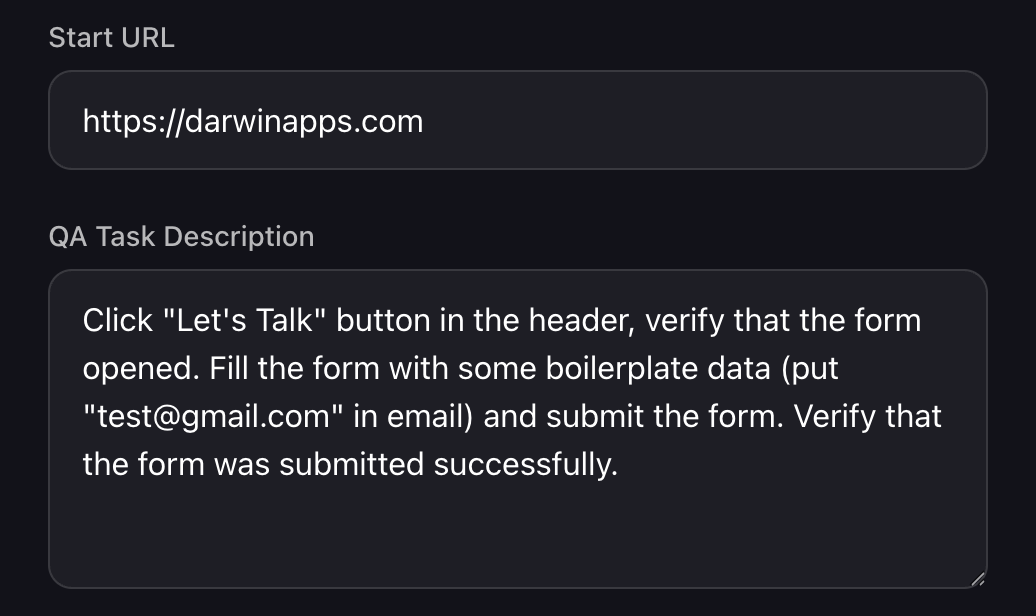
Just enter your URL and describe what to test: "Go to checkout, add a product, verify the discount applies." No code, no selectors, no technical skills required.
AI-Powered Website Testing
Just enter your URL and describe what to test in plain English. Our AI agent runs 24/7, saves every action with screenshots, and alerts you the moment something breaks.
Selenium and Cypress read code—they're blind to what users actually see. Humaneye tests the visual experience, catching the bugs that cost you money.
Just enter your URL and describe what to test: "Go to checkout, add a product, verify the discount applies." No code, no selectors, no technical skills required.
Our agent "sees" your website like a human user. It finds buttons by appearance, not brittle CSS selectors—so tests don't break when developers change class names.
Set your schedule and forget it. Tests run automatically every hour, daily, or whenever you need. Catch issues before your customers do.
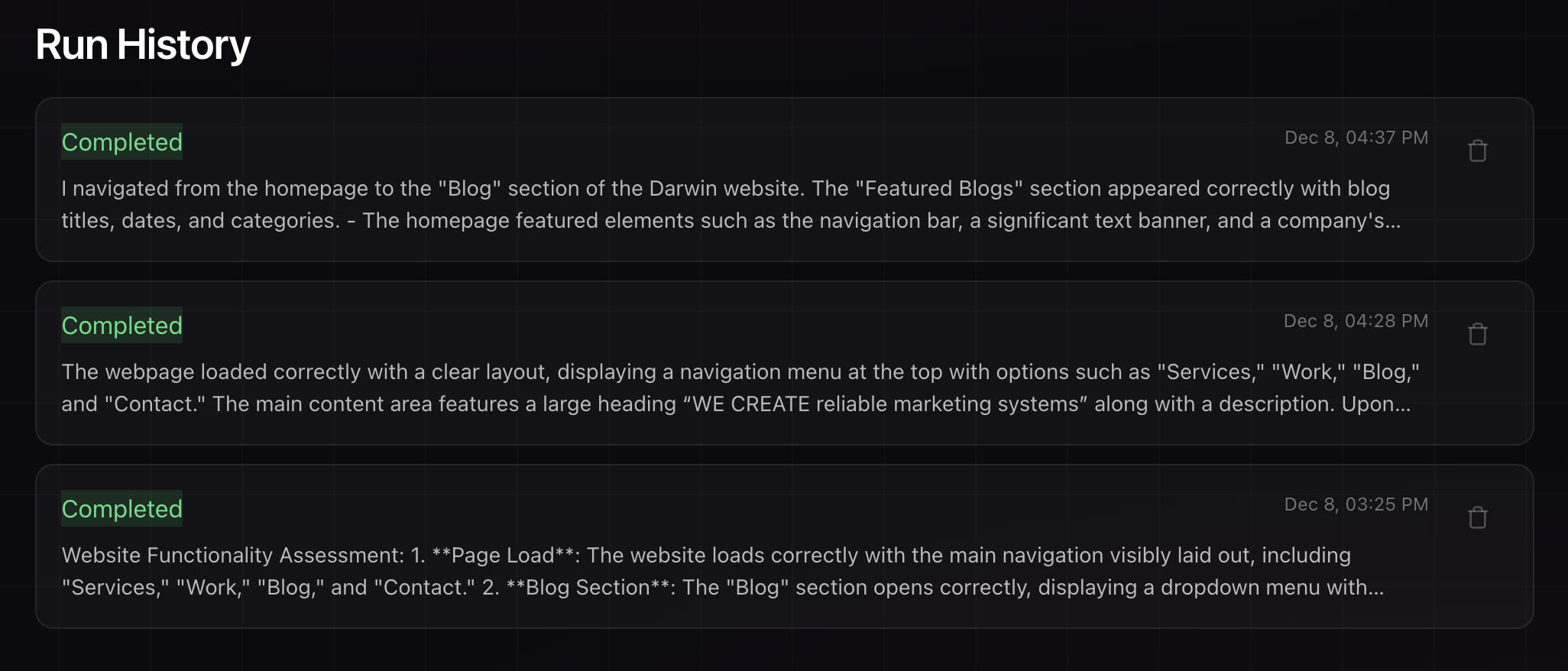
Every test run is saved to your dashboard with full details: actions performed, issues found, and overall status. Review your testing history anytime.
Drill into any run to see exactly what happened. The agent captures a screenshot at every action, so you can see precisely what it saw and did.
Our supervisor agent reviews failures before alerting you, virtually eliminating false positives. Get notified only when there's a real problem.
 // Selenium / Cypress

driver.findElement(By.id('submit-btn-v2'))

  .click();
The Bug
A CSS update accidentally places an invisible overlay on top of your "Checkout" button. The button exists in the DOM and is technically clickable via JavaScript.
Full setup in under 5 minutes. Here's how simple it is:
Add your website URL and describe what the agent should test in plain English. Tell it what actions to perform and what behavior you expect.
Your test runs automatically on your schedule. The AI agent opens a real browser, navigates your site, and performs actions exactly like a human visitor.
Each test run is logged to your dashboard with a complete summary: what was done, problems encountered, and the overall result. Nothing gets lost.
When something breaks, you'll know immediately. The agent sends alerts to your preferred channel—Email, Slack, or WhatsApp—with details and screenshots.
Whether you're protecting ad spend, client relationships, or search rankings—Humaneye keeps watch so you can focus on growth.
"Spending $5,000/day on ads while a broken form silently kills conversions"
"Flash sale running while "Add to Cart" is broken on mobile"
"Client calls YOU yelling about their broken site before you even knew"
"A dev pushed noindex tags to money pages—traffic tanks before you notice"
Not at all. Our agent acts just like a single human visitor. If you schedule it to run 4 times a day, that's just 4 page views. It creates zero noticeable load on your infrastructure compared to your regular traffic.
Your data stays clean. We provide a specific User-Agent string and IP address for our bots. You can simply add a filter in Google Analytics (or your preferred tracking tool) to exclude this traffic, ensuring your reports remain 100% accurate.
We use a "Double-Check" system. We don't just rely on one agent. If the primary testing agent detects an error, a second, separate "Supervisor Agent" reviews the screenshots and logs to verify the failure before we send you an alert. This virtually eliminates false positives.
Good news: There is absolutely nothing to install. Because our agent uses "Computer Use" technology, it works entirely from the outside—just like a real customer visiting your site. You don't need to add code to your website, install plugins, or give us backend access. Just provide the public URL, and we handle the rest.
Traditional tools are "blind"—they read HTML code, not visuals. When a developer changes a CSS class, tests break. Humaneye uses visual AI to see your site like a human does. If a button still looks like a button, our tests keep working. We also catch visual bugs (like overlays blocking buttons) that code-based tools miss entirely.
You get an instant alert via email (and optionally Slack) with screenshots showing exactly what the AI saw at each step. You can see precisely where the failure occurred and what the page looked like at that moment—making debugging fast and straightforward.
Set up your first test in under 5 minutes. No credit card required. No code to install. Just peace of mind.
Free plan includes 100 test runs per month